孫小芳のBlender部屋
Home
Blender
作品集
Linux
作品集
2015年10月1日
鎖定攝影機至視圖(Lock Camera to View)
File (Menu) > User Preferences > Input > 3D View > 3D View (Global)
檔案 > 使用者偏好設定 > 輸入 > 3D視圖 > 3DView(Global)
+Add New > wm.context_toggle > 情境設定:space_data.lock_camera
2015年9月29日
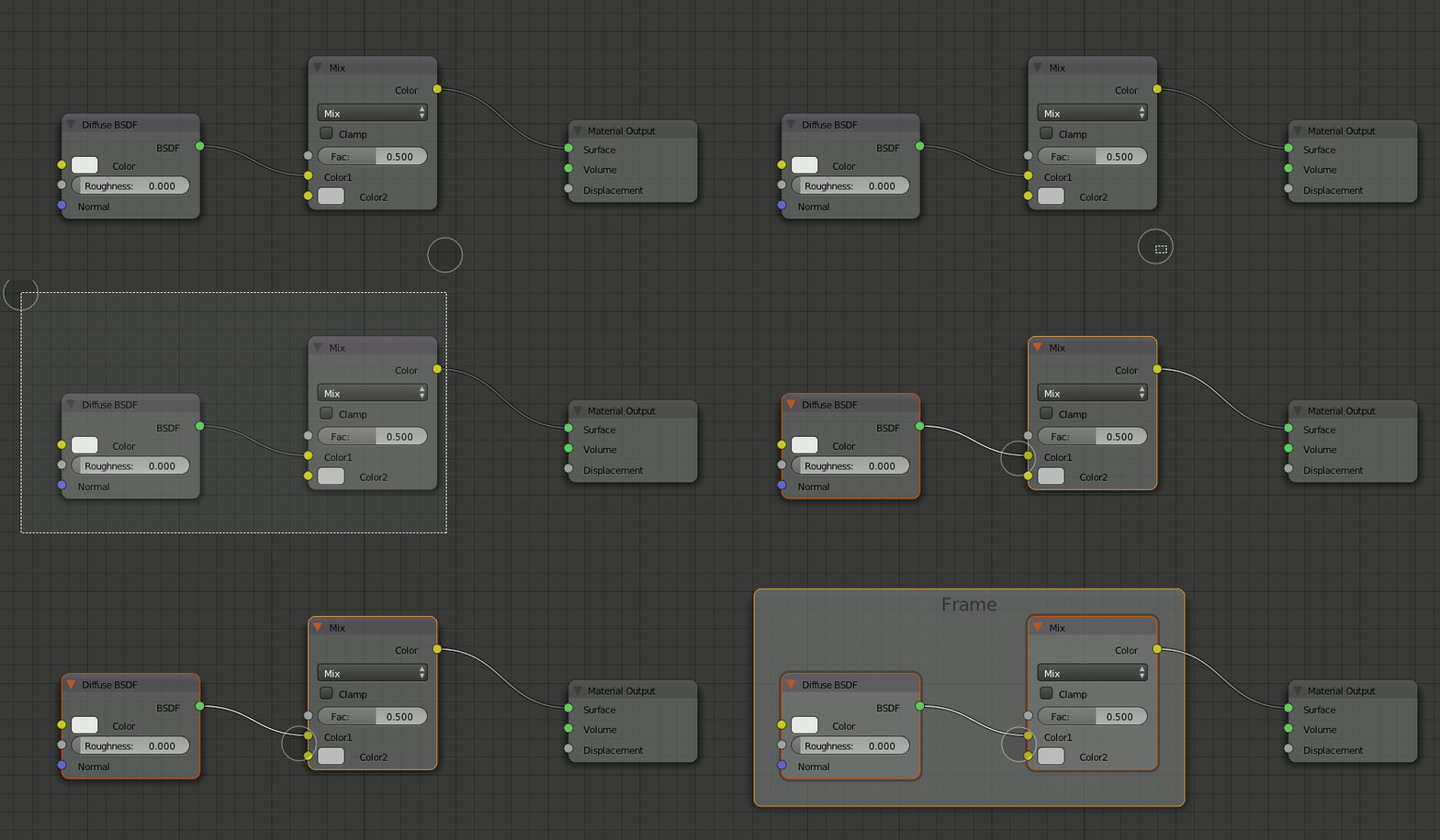
node使用快捷鍵
切掉連線
Ctrl
拖曳左鍵
只去處
node
,連線存在
Ctrl X
將node從連線取出
Alt D
複製node跟之前的連線
Ctrl Shift D
製作重新路由
Shift 拖曳左鍵
製作frame並將所選node放入Frame
Ctrl J
參考:Basics about - a.k.a. why I Love - the Blender Node System
2015年9月28日
Krita on Mac
日本語or繁体字表示
『Settings』>『Switch Application Language』>『Primary Language』>『Japanese』or『Chinese Traditional 』
右鍵調色盤
preferences > 顯示 > 取消OpenGL
中鍵移動畫布
Tablet畫筆中鍵設定
2015年7月3日
頂點法線的修正(clear custom split normals data)
據說Import的obj檔案有時會出現這樣的怪異。
打開Edit Mode, 顯示頂點的法線,法線角度不一致。
properties > object data > Geometry Data >Clear Custom Nomals Data
法線角度重新被整理過了,
物體模式也乾淨了。
j
2015年6月9日
WaterColor
Blender Cycles 2.74 + freestyle
2015年6月7日
尋找失落的圖檔
打開被放置許久的blender檔案,render 後常出現粉紅色的不美麗景象,這可能是因為檔案的移動,導致圖檔設定的路徑錯置。如果平常有習慣把材質用的圖檔存在特定的地方,解決方案可用File > extemal Data > Find Missing files:尋找有可能儲存圖檔的文件夾。
2015年6月1日
讓不需要的貼圖消失
打開UV/圖片編輯器
選擇已經不需要的圖檔
Shift +(×)
圖檔名的前面會出現0
存檔,重新打開Blender檔案後圖檔就會自動消失。
較新的文章
較舊的文章
首頁
訂閱:
意見 (Atom)